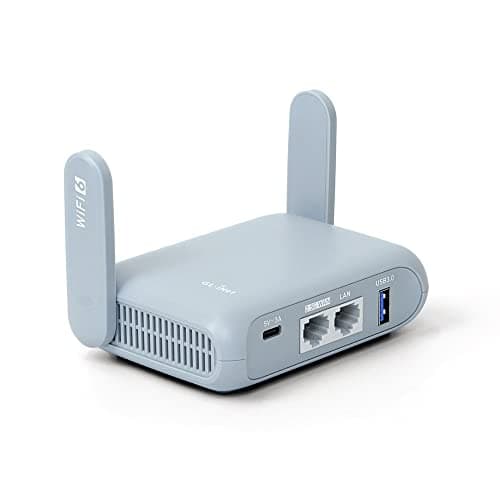
The GL.iNet Beryl AX is the pick under $100, and it is for the traveler who works from hotels and needs the connection to hold — Wi-Fi 6, a 2.5G WAN port so the router is not the bottleneck, a USB 3.0 port for a tethered phone, and OpenWrt underneath so it takes a WireGuard or OpenVPN config and puts every device behind that tunnel. The budget pick is the TP-Link TL-WR802N, the cheapest thing here and an honest answer to exactly one problem — with the warning that it is only that one problem. Every price below is read live from our price layer and stamped with an as-of date in the table — the $100 band describes those prices on that date.
Why $100 is the line that matters here
Travel routers look like a speed category and they are not. Almost nobody buys one because hotel Wi-Fi is slow; they buy one because of two very specific, very ordinary annoyances.
- The login problem. The hotel charges per device, or the captive portal only lets one thing on, and you arrived with a laptop, a phone, a tablet and a streaming stick. A travel router takes one login and hands out its own network to everything behind it.
- The trust problem. Everything you do is crossing a network run by strangers and shared with strangers. A router with a VPN client encrypts the whole lot at the router, so every device behind it is covered — including the ones that cannot run a VPN app at all, like a streaming stick or a games console.
Every router on this page solves the first problem. The $100 band is where the second one gets solved. That is the whole reason to draw the line here rather than at $50: at fifty dollars you can buy a device that shares a login, and you cannot reliably buy one that runs a real VPN client. Which is a different page, and a worse purchase for most people.
How we built the band
- A pick only appears if our live price layer shows it under $100. No product record on this site has a price field — the numbers in the comparison table are read at request time and carry the date they were collected. Three qualify, with the nearest about fifteen dollars clear of the line.
- Three qualifying picks minimum, or no page.Exactly three qualify, which is the floor. We did not build a $50 band: only two routers would qualify, and the page’s entire argument collapses if the one pick that encrypts anything is excluded by the title.
- Routers over the line are named in prose, never ranked. Two are worth knowing about. The GL.iNet Slate AX is the one built for a room full of devices — its listing claims up to 120 connected at once, with MU-MIMO and OFDMA, which is what stops a shared network falling over when six people want it. It costs meaningfully more than the Beryl AX and gives up the 2.5G WAN port, so you are paying for client capacity rather than line speed. The GL.iNet Slate 7 sits above that again. Both are on our main travel router roundup, and neither is a pick here because neither is under $100.
Which router for which traveler
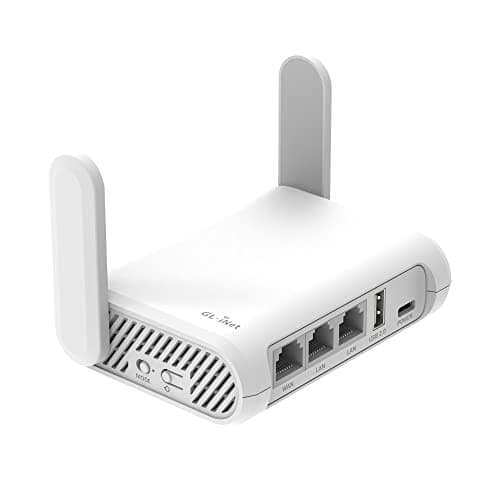
Working from hotels, and the default. The GL.iNet Beryl AX. The 2.5G WAN port is the unusual specification at this size and it means the router is not the bottleneck on a fast hotel or apartment line. OpenWrt underneath is what makes the VPN real rather than marketing: give it a config file and everything behind it uses that tunnel. The USB 3.0 port takes a phone tethered over cable or a USB modem, which is the fallback for the night the hotel Wi-Fi is simply unusable. GL.iNet publishes a two-year warranty and a 30-day money-back window on its own product page.
Three honest limits. It is a router, not an appliance — the first ten minutes are an admin page, and that is the real cost of giving one as a gift. It needs a USB-C power source, which is one more cable. And GL.iNet publishes no VPN throughput figure for this model, so the honest answer to “how fast is it with the tunnel on?” is that we do not know, and we are not going to invent a number.
A long stay, powered off a laptop or a power bank. The GL.iNet Opal. It does the same two jobs — one login covering every device, and its own encrypted network on top of a shared public one — in something small and USB-powered, so it runs off a laptop port or a power bank rather than needing its own wall socket. Setup still asks for a few minutes with an admin page, and captive-portal hotel networks occasionally need a manual workaround. For a digital nomad in a long-stay hotel this is the sensible middle of the band.
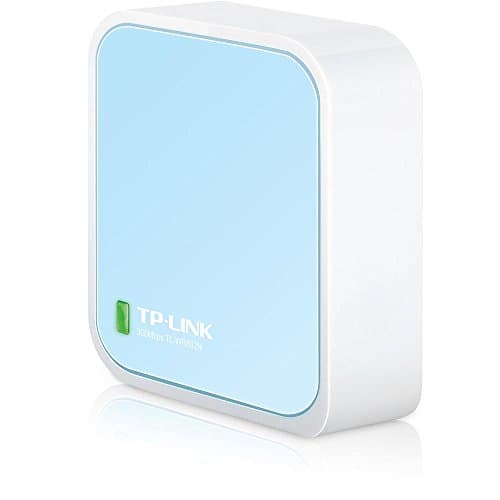
One extra device online, and our budget pick. The TP-Link TL-WR802N. It does the core job — turn one paid login into a small private network — for a fraction of the GL.iNet prices, in something pocket-sized and cheap enough to live permanently in a bag and never be missed if it is lost. Five published modes mean it also works as a range extender or a wired-to-wireless bridge for a smart TV.
We are going to be blunt about what it is not, because this is the single most important sentence on the page: it has no VPN client, so it solves the login problem and does nothing at all about the trust problem. It is also 2.4 GHz only and N300, which means it is slow by modern standards, will cap a fast hotel line, and sits on the most congested frequency in any building. If privacy on shared Wi-Fi is the reason you are shopping, this is the wrong product at any price.
What the band costs you, and what it does not
What it costs: client capacity. The routers above $100 in our registry are sold on how many devices they hold up at once — MU-MIMO, OFDMA, a published 120-device ceiling — which matters for a family room or a shared apartment and does not matter at all for one person with four devices. You also give up some antenna hardware and, at the very bottom of the band, modern Wi-Fi standards entirely.
What it does not cost: the VPN client, OpenWrt, line speed (the top pick here has a faster WAN port than the model above it), the warranty, or the core function. This is a category where the sub-$100 band genuinely contains the best buy rather than a compromise, and that is unusual enough to say plainly.
The thing nobody tells you about travel routers
The setup is the product. Every complaint we see about this category is really a complaint about the first fifteen minutes: finding the admin page, pasting a VPN config, getting past a captive portal that wants a browser on the device that is actually connecting. None of that is hard, and all of it is a thing you want to do once at home rather than at eleven at night in an unfamiliar hotel.
So if you are buying one for yourself, configure it before the trip. If you are buying one as a gift, be honest with yourself about whether the recipient opens settings pages for fun — for someone who does not, a router that sits in its box is worse than no gift, and a travel power strip or a universal adapter is the better present at the same money.
One more practical note: a travel router needs power, and hotel desks are short of sockets. The strip and the router are a natural pair, which is the argument our business travel accessories page makes at more length.
Do you actually need one?
Three honest tests. If you travel with more than two connected devices and keep hitting per-device charges, yes. If you work from hotels and handle anything you would not want read, yes — and buy one with a VPN client. If you travel with a phone, a laptop and nothing else, and the hotel Wi-Fi is free and unlimited, then probably not, and the money is better spent on a power bank you will use every single day.
For the full category including the models built for a room full of people, see our travel router roundup. For the wider kit a remote worker carries, gifts for digital nomads is the better starting point.
Decide whether you need a VPN client
It is the only specification in this category that changes what the product is for. Without one you are buying a login-sharer; with one you are buying encryption for every device behind it, including the ones that cannot run a VPN app.
Count your devices, not your megabits
Travel routers are rarely the speed bottleneck. What separates the tiers is how many clients they hold up at once, which is a family question rather than a solo one.
Check how it is powered
USB-powered models run off a laptop or a power bank, which is genuinely useful in a room with one socket. It also means one more cable in the bag.
2.4 GHz only is a real limitation
It is the most congested frequency in any hotel. At the bottom of the band that is the trade you are making, and it is fine for a second device and poor for a working day.
Set it up at home
Find the admin page, load the VPN config, and test it on your own network before the trip. The failure mode of this category is a device configured for the first time in a hotel lobby.
Captive portals still need a browser
Hotel sign-in pages occasionally need a manual workaround even with a good router. Expect it once in a while rather than being surprised by it.