Do three things and the problem goes away: audit down to one cable per port type rather than one per device, put the laptop charging brick in its own compartment so it stops crushing everything else, and keep the entire kit in one case that leaves the bag as a unit. Almost everyone attacks this in the wrong order — they buy a case first and then put the same unexamined tangle inside it. The case is the last step, not the first, and once the kit is right the case almost chooses itself.
Step 1 — Empty it out and count ports, not cables
Tip the whole kit onto a bed. Most travelers find five to nine cables and discover they only have three kinds of port: USB-C, Lightning (older iPhones and some accessories), and whatever the laptop uses. A cable is not "the phone cable" and "the earbuds cable" — it is a USB-C cable, and one of them charges both.
The target is one cable per port type, plus one spare of whichever type gets used most. That is usually three or four cables instead of eight, and it is the single biggest reduction available. Cut the duplicates, the freebie cables that came in boxes, and anything with a connector no device in the bag actually has.
Two length rules save real frustration. One cable should be long — long enough to reach from a hotel socket behind a nightstand to a bedside phone, which is the one scenario short cables always fail. The rest should be short, because a short cable coils smaller and does not bind around everything else in the case.
Step 2 — Deal with the brick, because it is the real problem
This is the finding that changes the whole category. The object that wrecks a tech kit is not a cable, it is the laptop charger: it is dense, rigid and roughly the size of a deck of cards, and packed in the same single layer as everything else it flattens the cables and dongles it is pressed against. That is the most common failure in a tech pouch, and it is the reason the flat cases people buy on looks so often disappoint them.
There are only two good answers. Either the case has a second, deeper compartment the brick lives in on its own — the structured dual-compartment shape — or the brick travels outside the case entirely, in the main bag, and the case stays slim. Both work. What does not work is forcing a brick into a flat clamshell, which ruins exactly the slimness you bought it for.
Step 3 — One case, not three
A kit split between a pouch, a jacket pocket and the laptop sleeve is a kit where something always gets left in a hotel. One case means one thing to look for before checkout and one thing to hand over at security. It is also the only way the next rule works.
The rule: every cable goes back in the same slot every time. Elastic loops make this automatic because each loop is a named place; a drawstring pouch makes it impossible because everything lands in the same void. After about a week, the hand finds the right cable without the eyes being involved, and that is the state you are aiming for.
Step 4 — Coil them properly and stop them unspooling
Fold each cable in half, then loop it into a coil roughly the diameter of a coffee cup, and secure it with a reusable tie near the connector end. Don't wrap cables tightly around two fingers or around a plug — a hard bend at the connector is where cables fail, and every frayed phone cable in the world has the same injury in the same place.
Anything with a right-angle connector or a fabric braid coils better than bare PVC. If a cable will not stay coiled, it is usually too long for its job, which is back to Step 1.
Step 5 — Label the identical ones
Modern USB-C cables look alike and are not alike: some carry data and some only power, and some handle a laptop's wattage while others throttle it. A strip of tape or a cheap cable tag with "laptop" or "data" on it ends the five-minute guessing game at the worst possible moment, which is in an airport with ten percent battery.
What travels in the case, and what does not
In: cables, the wall plug, the power bank, earbuds, dongles and adapters, a short extension if the trip involves a shared socket. Out: the laptop brick if the case is a flat one, anything liquid, and the passport — a tech case is the wrong place for documents, because it comes out at security and gets put down on tables.
Two flight-specific constraints. Power banks and spare lithium batteries belong in the cabin, never in checked luggage, which means the case rides with the passenger — the rules are in can you take a power bank on a plane. And a plug adapter changes the shape of the plug, not the voltage; anything that needs a voltage converter is a different purchase, covered in travel adapter vs voltage converter.
Then — and only then — pick the case
Three shapes cover everyone, and they are ranked below in the order most travelers should consider them.
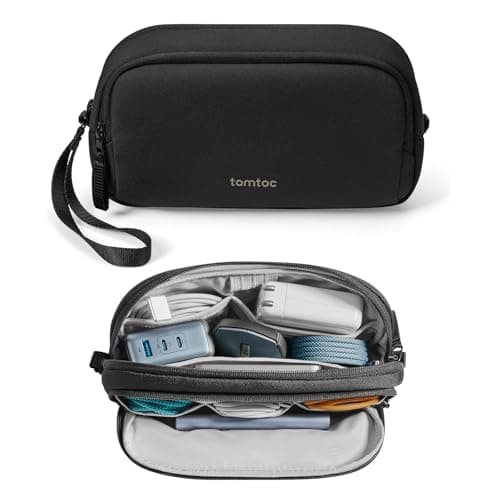
Structured and dual-compartment if there is a laptop brick. The brick gets its own room, the case stands up on a hotel desk instead of flopping open, and nothing gets flattened. The cost is depth: at nearly three inches thick it will not slide into a laptop sleeve alongside a laptop.
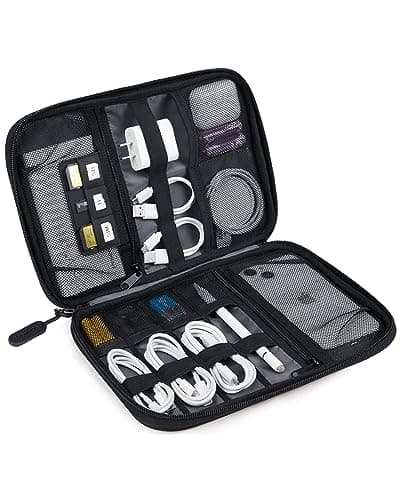
Flat clamshell if there is no brick. Under an inch thick, a dozen elastic loops, everything visible the moment it opens, and it rides flat against a laptop instead of stealing depth from the main compartment. The cost is that it is the wrong shape for a brick, and half empty it goes floppy.
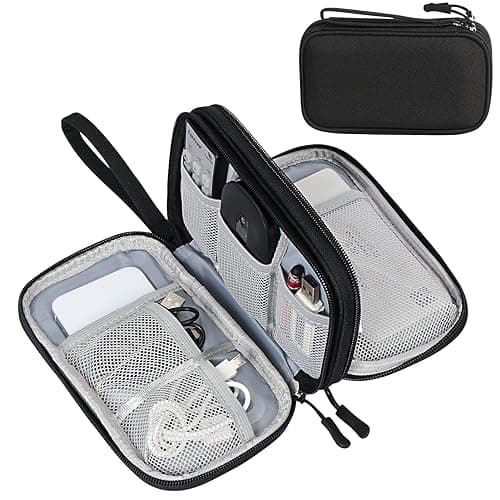
A small two-layer pouch as a second case or a cheap start. It is the right answer for splitting the charging kit out of a bigger case, or for a traveler whose entire kit is a phone cable and earbuds. It has no structure, and the zips are the first thing to fail.
The full category — including the premium end, where Peak Design and Bellroy compete on fold-out organization rather than on capacity — is ranked on the travel tech organizer roundup, and the two-model question that comes up most is settled in Peak Design Tech Pouch vs Bellroy Tech Kit.
What this does not fix
Organizing cables does not reduce how much you carry — it just stops the carrying being miserable. If the goal is genuinely less tech in the bag, the lever is devices, not cases: one device that charges over the same port as the phone removes a cable permanently, and a power bank with a connector built into it removes another. Those are the choices made in Anker vs INIU and on the travel gadgets roundup.
Quick answers
How do you keep cords organized when traveling?
One case, one cable per port type, the laptop brick in its own compartment, and every cable in the same slot every time. The habit does more than the product.
How many cables should you take?
One per port type in the bag, plus one spare of the type used most. For most travelers that is three or four, not eight.
What is the best way to coil a cable?
Fold in half, coil loosely to about the diameter of a coffee cup, tie near the connector. Avoid tight wraps around a plug — that is where cables break.
Flat case or structured case?
Flat if there is no laptop brick; structured with two compartments if there is. The brick is the variable that decides it, not the cable count.
Can the tech case go in checked luggage?
Not with a power bank in it. Lithium batteries fly in the cabin with the passenger, so the case does too.
What to spend
There is a genuinely usable case at stocking-stuffer money and the structured ones cost a few times that. Beyond the structured tier you are buying materials and fold-out organization rather than function. Every button here shows a live price with the date it was checked.